Desert Sunset Watercolor Photoshop Style Guide
Capturing the ethereal quality of a desert sunset—the way light bleeds into shadow, turning sand dunes into waves of amber and violet—is notoriously difficult in digital design. Traditional watercolor techniques require patience, specific paper textures, and a steady hand. The Desert Sunset Watercolor Photoshop Style bridges this gap, offering designers a streamlined method to infuse their work with organic warmth and artistic depth without spending hours on manual blending.
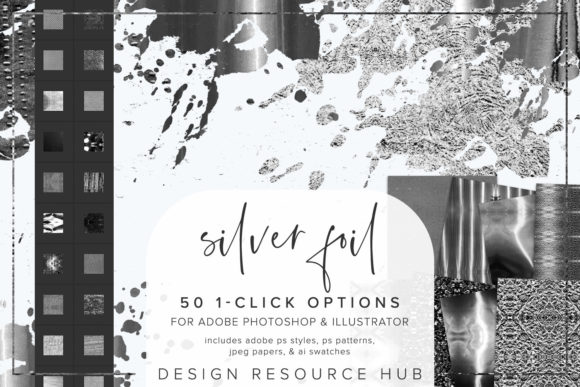
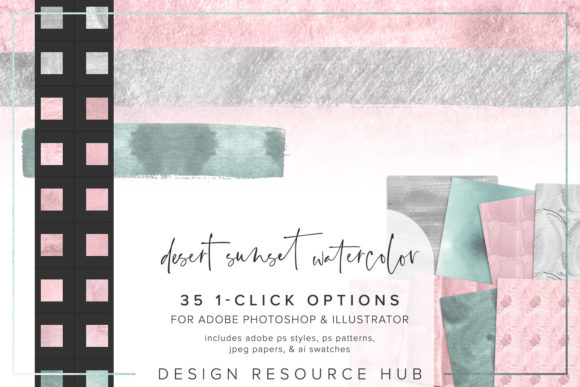
This resource is not merely a filter; it is a comprehensive toolkit designed for Adobe Photoshop and Illustrator. It allows creators to apply complex textural effects with a single click, transforming flat vectors or standard typography into pieces that feel hand-painted. For professionals juggling tight deadlines and hobbyists looking to elevate their personal projects, understanding how to leverage these assets can significantly enhance both workflow efficiency and visual impact.
Understanding the Toolkit Components
To maximize the utility of the Desert Sunset Watercolor Photoshop Style, it is essential to understand what is included in the package and how each file type serves a different function within your creative suite. The set is engineered for versatility, ensuring compatibility across major Adobe applications.
- Adobe Photoshop .pat file: This contains seamless patterns that mimic the granular texture of watercolor paper and pigment settlement. These are crucial for creating backgrounds or filling large shapes with consistent, non-repeating visual interest.
- Adobe Photoshop .asl file: The core of the package, these layer styles allow you to apply drop shadows, inner glows, and texture overlays instantly. They are the "one-click" solution mentioned in the product description, ideal for rapid prototyping.
- Adobe Illustrator .ai swatch file: For vector-based workflows, these swatches ensure that your gradients and colors remain editable and scalable. This is particularly useful for logo design or large-format printing where raster images might lose clarity.
- JPEG paper files: Sized at 10 x 10 inches, these high-resolution scans provide authentic paper grain. They serve as excellent base layers or masking elements to break up the digital perfection of computer-generated graphics.
By combining these elements, you move beyond simple color application. You are adding physicality to your digital canvas. The interplay between the .asl styles and the .pat patterns creates a depth that flat colors simply cannot achieve.
Practical Applications Across Industries
The aesthetic of a desert sunset—warm, inviting, and slightly nostalgic—has broad appeal. However, the technical ease of the Desert Sunset Watercolor Photoshop Style makes it viable for a surprising range of professional and personal uses.
Branding and Marketing Materials
For entrepreneurs and marketers, standing out in a saturated digital landscape is critical. Brands in the wellness, travel, and organic food sectors often seek visuals that convey calmness and authenticity. Applying these watercolor styles to social media graphics, email headers, or packaging mockups can soften corporate rigidity. Imagine a skincare brand using the subtle orange-to-purple gradient of the style on their Instagram stories; it communicates natural ingredients and gentle care without saying a word.
Educational and Editorial Design
Educators and publishers can benefit from the readability and engagement factors of textured design. Textbooks, worksheets, or blog headers that utilize harsh, solid colors can feel sterile. By applying the Desert Sunset texture to section dividers or background accents, you create a more welcoming learning environment. The organic edges help guide the eye without the aggression of sharp geometric lines.
Digital Art and Personal Projects
Freelancers and hobbyists often use these tools for invitation suites, wedding stationery, or personal art prints. The ability to change the scale of the patterning means you can adapt the style for a small business card or a large wall art print. The seamless nature of the patterns ensures that whether you are tiling a background for a website or filling a large poster, the texture remains consistent and visually pleasing.
Installation and Workflow Integration
One of the strongest selling points of this style pack is its seamless integration. There is no steep learning curve, which is vital for maintaining productivity. Here is how to effectively implement these tools into your daily workflow:
- Load the Styles: In Photoshop, navigate to the Styles panel. Use the "Import Styles" option to load the .asl file. Once loaded, these presets appear as clickable thumbnails. You can now apply the entire desert sunset effect to any selected layer with a single mouse click.
- Import Patterns: Go to the Patterns panel and select "Import Patterns" to load the .pat file. These are best used when you need to fill a shape with texture rather than just applying an overlay effect. Remember, you can adjust the scale of these patterns in the Layer Style dialog box to suit your specific design resolution.
- Activate Swatches: In Illustrator, open the Swatch Library menu, choose "Other Library," and locate the .ai file. This adds the specific color palettes and gradient meshes associated with the desert theme to your workspace, ensuring color consistency across all vector elements.
Pro tip: Do not rely solely on the one-click application. For a truly custom look, combine the Photoshop styles with custom brushes. Use the watercolor texture as a base, then paint over it with a dry brush tool to add irregularities. This hybrid approach maintains the speed of the preset while adding unique, human touches that prevent your design from looking like a template.
Maximizing Visual Impact
When using the Desert Sunset Watercolor Photoshop Style, consider the context of your background. Watercolor effects thrive on contrast. If you are applying these styles to text, ensure the underlying background is clean enough for the texture to be visible, but textured enough to provide depth. A pure white background might make the subtle grains disappear, while a dark, complementary background can make the warm sunset tones pop vibrantly.
Furthermore, experiment with blending modes. While the styles come with predefined settings, changing a layer’s blend mode to Multiply or Overlay can integrate the texture more naturally with photographic elements. This is particularly effective when adding accents to images, such as framing a portrait with a watercolor border that feels like it was painted directly onto the photo.
Ultimately, this toolkit is about balancing efficiency with artistry. It removes the technical barriers of simulating traditional media, allowing you to focus on composition and message. Whether you are designing a corporate brochure or a personal greeting card, the Desert Sunset Watercolor Photoshop Style offers a reliable, professional-grade solution for adding warmth and character to your digital creations.