Mastering Dynamic Textures with 50 HQ SPLASHES Brushes for Photoshop
In the evolving landscape of digital art and graphic design, texture is not merely an aesthetic addition; it is a fundamental component of visual storytelling. The difference between a flat, sterile image and one that breathes with life often lies in the subtle imperfections and organic movements captured within the artwork. For designers, illustrators, and photographers seeking to inject energy and realism into their projects, the 50 HQ SPLASHES Brushes for Photoshop offer a robust solution. This comprehensive collection provides high-resolution tools that simulate fluid dynamics, allowing creators to replicate the chaotic beauty of liquid interactions with precision and ease.
The Power of High-Resolution Digital Assets
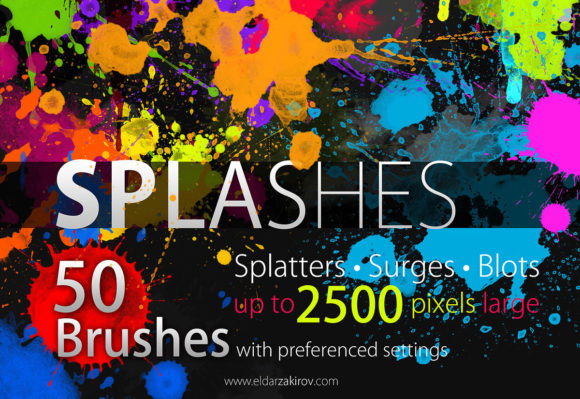
When working with digital brushes, resolution is paramount. Low-quality assets often result in pixelation when scaled, breaking the immersion of the final piece. The 50 High Resolution SPLASHES Brushes for Photoshop CS are engineered to maintain clarity up to 2500 pixels, ensuring that every droplet, smear, and splatter retains its crisp definition regardless of the canvas size. This level of detail is crucial for professional applications, such as large-format printing, high-definition web banners, or detailed concept art where viewers may zoom in to inspect the intricacies of the work.
These brushes are not limited to Adobe Photoshop alone. Their versatility extends to other popular creative software, including Photoshop Elements, Affinity Photo, and Adobe Fresco. This cross-platform compatibility ensures that artists are not locked into a single ecosystem, providing flexibility in workflow and tool selection. Whether you are a hobbyist experimenting with digital painting or a seasoned professional delivering client work, the ability to integrate these assets seamlessly into your preferred environment enhances productivity and creative freedom.
Diverse Texture Categories for Enhanced Realism
A common misconception about splash brushes is that they are one-dimensional. However, this curated set includes five distinct categories, each serving a unique purpose in the composition process. Understanding the specific characteristics of each type allows artists to layer effects realistically.
- Splash: These brushes capture the moment of impact, featuring radial patterns that suggest force and velocity. They are ideal for depicting objects entering water or explosive liquid movements.
- Splatter: More random and scattered than standard splashes, splatter brushes mimic the erratic nature of paint thrown from a distance. They add depth and background noise to compositions.
- Blot: Soft-edged and absorbent in appearance, blot brushes simulate liquids soaking into porous surfaces like paper or fabric. They are essential for creating grounded, realistic stains.
- Smudge: These tools replicate the effect of fingers or tools dragging wet media across a surface. They are invaluable for blending colors and creating motion blur effects manually.
- Fingerprints and Drip-drop: Adding human elements through fingerprints or the gravity-driven pull of drip-drops introduces narrative cues, suggesting interaction and the passage of time.
Practical Applications Across Industries
The utility of the 50 HQ SPLASHES Brushes for Photoshop extends far beyond traditional digital painting. Various industries leverage these textures to solve specific visual challenges and enhance brand messaging.
Advertising and Product Photography
In commercial advertising, particularly for beverages, cosmetics, and cleaning products, the depiction of freshness and efficacy is critical. A perfume advertisement might use fine mist and splatter brushes to evoke a sense of lightness and aroma. Similarly, a sports drink campaign could utilize dynamic splash brushes to convey hydration and energy. By integrating high-resolution splash elements, designers can create composite images that look like high-speed photography without the logistical costs and complexities of a physical shoot.
Graphic Design and Typography
Typography often benefits from the addition of organic textures to break the rigidity of vector fonts. Designers can use smudge and blot brushes to create grunge-style posters, music album covers, or event flyers. The contrast between clean, modern typefaces and chaotic, hand-painted splash effects creates visual tension that captures attention. This technique is particularly effective in genres such as rock music promotion, streetwear branding, and edgy editorial layouts.
Digital Illustration and Concept Art
For concept artists working in fantasy or sci-fi genres, these brushes provide quick ways to establish atmospheric conditions. Rain-slicked streets, blood spatters in action scenes, or magical fluid effects can be rendered rapidly using preset brush shapes. This speed allows artists to iterate on ideas quickly during the brainstorming phase, focusing on composition and mood rather than getting bogged down in manual rendering of every individual droplet.
Workflow Integration and Technical Considerations
To maximize the potential of the 50 High Resolution SPLASHES Brushes for Photoshop CS, users should adopt a layered approach to their workflow. Rather than applying a splash effect directly onto the main artwork, it is advisable to create new layers for each texture element. This non-destructive method allows for adjustments in opacity, blending modes, and color without altering the underlying image.
Blending modes such as "Multiply" work exceptionally well for dark stains and shadows, while "Screen" or "Overlay" can enhance bright, reflective splashes. Adjusting the flow and opacity settings within the brush panel further customizes the intensity of the effect, enabling subtle integration rather than obvious overlays. Additionally, varying the brush size and rotation prevents repetitive patterns, ensuring that the final composition feels natural and unscripted.
It is also important to consider lighting consistency. When adding splash elements to a photograph or rendered scene, the direction of the light source must match the highlights and shadows within the brush stroke. Artists may need to use dodge and burn tools to adjust the brightness of specific areas within the splash, aligning them with the ambient lighting of the original image. This attention to detail separates amateur composites from professional-grade visuals.
Enhancing Creativity Through Constraint and Variety
While having access to thousands of brushes can sometimes lead to decision paralysis, a curated set of fifty high-quality options strikes a balance between variety and focus. The 50 HQ SPLASHES Brushes for Photoshop are selected to cover the most common and impactful liquid scenarios. This limitation encourages artists to master each brush, learning its nuances and quirks, rather than constantly searching for new tools. Mastery of a smaller, high-quality toolkit often leads to more distinctive and cohesive artistic styles.
Furthermore, these brushes serve as excellent educational tools for students and beginners. By studying how the pre-made shapes handle light, edge hardness, and dispersion, novice artists can learn the physics of fluid dynamics. This observational learning can then be applied when creating custom brushes or painting manually, fostering a deeper understanding of digital media properties.
Future-Proofing Your Digital Asset Library
As display technologies advance towards higher resolutions and larger formats, the demand for high-quality assets continues to grow. Investing in resources like the 50 High Resolution SPLASHES Brushes for Photoshop CS ensures that your work remains relevant and visually compelling across all mediums. Whether viewed on a smartphone screen or a billboard, the integrity of the texture remains intact. This future-proofing is essential for professionals who wish to maintain a competitive edge in a saturated market.
Moreover, the adaptability of these brushes supports emerging trends in mixed-media digital art. As boundaries between photography, illustration, and 3D rendering blur, the need for versatile texturing tools becomes increasingly apparent. These splash brushes bridge the gap between realistic photography and expressive painting, allowing artists to navigate these hybrid styles with confidence.
In conclusion, the integration of specialized texture tools into your digital workflow is not just about convenience; it is about expanding the vocabulary of your visual expression. The 50 HQ SPLASHES Brushes for Photoshop provide a reliable, high-quality foundation for creating dynamic, engaging, and realistic artwork. By understanding their capabilities and applying them thoughtfully, creators can elevate their projects, delivering results that resonate with audiences on a sensory level. Whether you are designing a corporate brochure or illustrating a fantasy epic, these brushes offer the fluidity and detail necessary to bring your vision to life.