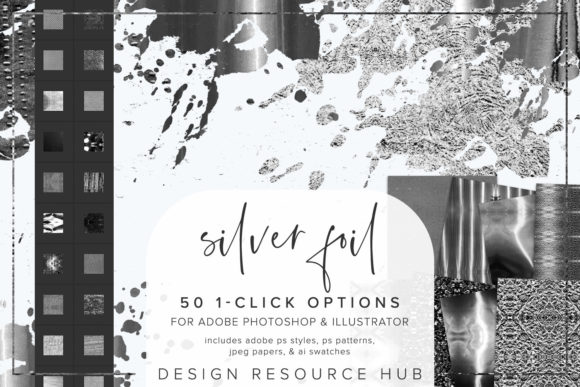
Elevating Digital Design with Silver Foil Photoshop Styles
In the rapidly evolving landscape of digital graphic design, texture and finish play pivotal roles in capturing audience attention. While flat design has dominated user interfaces for years, there is a growing resurgence of tactile aesthetics in marketing materials, social media graphics, and branding assets. Among these trends, metallic effects have carved out a significant niche, offering a sense of luxury and sophistication that flat colors often lack. Silver Foil Photoshop Styles represent a powerful toolset designed to bridge the gap between complex manual texturing and efficient, professional-grade output. This collection is not merely a set of filters; it is a comprehensive workflow solution for Adobe Photoshop and Adobe Illustrator users who demand high-quality results without sacrificing productivity.
The relevance of such tools extends beyond simple aesthetic preference. In modern creative workflows, time is a critical resource. Freelancers, marketing agencies, and independent creators are often tasked with producing high-volume content under tight deadlines. The ability to apply a realistic silver foil effect with a single click transforms what was once a hours-long process of layer masking, blending modes, and noise adjustment into a matter of seconds. This efficiency allows designers to focus more on conceptual development and less on repetitive technical execution.
The Shift Toward Tactile Digital Aesthetics
Consumer expectations regarding visual quality have shifted dramatically. As screens become higher resolution and color accuracy improves, audiences have developed a keen eye for detail. Flat, two-dimensional designs can sometimes feel sterile or generic in certain contexts, particularly in industries like fashion, beauty, hospitality, and premium retail. Here, the perception of value is closely tied to visual richness. Silver foil textures evoke the physical sensation of embossed printing and hot-stamping, techniques traditionally reserved for high-end physical packaging and stationery.
By integrating Silver Foil Photoshop Styles into digital projects, designers can replicate this premium feel in digital spaces. Whether it is an Instagram post announcing a limited-edition product, a website banner for a luxury service, or a digital invitation, the metallic sheen adds depth and intrigue. This trend reflects a broader movement in design where digital assets are expected to mimic the qualities of physical objects, creating a more immersive and engaging user experience. The seamless nature of these styles ensures that the texture looks authentic at any scale, maintaining integrity whether used on a small icon or a large header image.
Comprehensive Toolkit for Versatile Applications
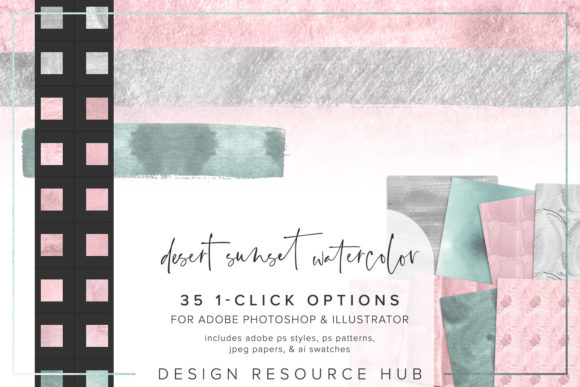
Understanding the components of this toolkit is essential for maximizing its potential. The package is designed to be interoperable across the two most popular applications in the creative industry: Adobe Photoshop and Adobe Illustrator. This cross-application compatibility is crucial for modern designers who often switch between raster and vector environments depending on the project requirements.
- Adobe Photoshop .pat file: This pattern file allows for the creation of seamless backgrounds and fills. It is ideal for covering large areas with consistent metallic texture, ensuring that edges align perfectly without visible seams.
- Adobe Photoshop .asl file: The layer styles file contains pre-configured settings including bevels, embossing, gradients, and shadows. These are the core elements that create the illusion of raised, reflective silver foil.
- Adobe Illustrator .ai swatch file: For vector-based work, this swatch library enables users to apply metallic textures directly to shapes and paths. This is particularly useful for logo design and scalable graphics where resolution independence is required.
- JPEG paper files: Sized at 10 x 10 inches, these high-resolution background images provide a realistic substrate for the foil effects. They simulate the grain and texture of high-quality cardstock or textured paper, adding another layer of realism to the final composition.
This holistic approach ensures that designers are not limited to a single type of output. Whether working on a print-ready brochure or a web-optimized graphic, the tools provided cover the necessary bases for professional results.
Streamlining Installation and Workflow Integration
One of the primary barriers to adopting new design assets is the complexity of installation. However, the architecture of Silver Foil Photoshop Styles prioritizes ease of use. The single-click styles are completely seamless, meaning they can be applied to any design element with minimal friction. This user-friendly approach lowers the learning curve, making advanced texturing accessible to beginners while still offering the flexibility professionals require.
To integrate these tools into your workflow, follow these straightforward steps:
- Install the .asl file: Navigate to the Styles panel in Photoshop. Select "Import Styles" from the menu options and load the .asl file. This action populates your styles panel with the preset silver foil effects, ready for immediate application.
- Install the .pat file: Access the Patterns panel in Photoshop. Choose "Import Patterns" and select the .pat file. These patterns can then be used as fills for shapes or backgrounds, providing the base texture for the foil effect.
- Install the .ai file: In Adobe Illustrator, open the Swatches panel. Go to "Open Swatch Library" and select "Other Library," then navigate to the .ai file. This loads the metallic swatches into your workspace, allowing you to apply them to vector objects instantly.
Once installed, the versatility of these tools becomes apparent. You can apply the Photoshop styles and Illustrator swatches to shapes, text, borders, and other elements with a single click. Furthermore, the ability to change the scale of the patterning allows for customization based on the specific needs of the design. A finer scale might be suitable for delicate typography, while a coarser scale could work better for bold headlines or background accents.
Practical Implications for Creators and Businesses
For business owners and marketers, the adoption of such tools translates to brand consistency and cost efficiency. Maintaining a cohesive visual identity across various platforms is challenging when resources are limited. By using standardized styles like Silver Foil Photoshop Styles, teams can ensure that all metallic elements share the same look and feel, reinforcing brand recognition. This consistency builds trust and perceived value among consumers.
Freelancers and educators also benefit significantly. For freelancers, the speed of implementation means faster turnaround times for clients, potentially increasing billable capacity. For educators teaching graphic design, these styles serve as excellent examples of how layer styles and patterns interact to create complex visuals. They allow students to deconstruct professional effects and understand the underlying principles of light, shadow, and texture without getting bogged down in tedious setup procedures.
Moreover, the combination of these styles with custom brushes opens up even more creative possibilities. Designers can paint foil effects onto specific areas of an image, creating organic, hand-crafted looks that differ from rigid geometric applications. This hybrid approach leverages the precision of digital tools with the spontaneity of traditional art methods.
Adapting to Modern Design Demands
The evolution of design software has always been driven by the need for greater efficiency and higher quality. Silver Foil Photoshop Styles fit squarely into this narrative. They address the modern demand for high-fidelity visuals that can be produced rapidly. As social media algorithms favor visually striking content, the ability to quickly generate eye-catching metallic graphics provides a competitive edge.
It is important to note that while these tools simplify the process, artistic judgment remains crucial. Effective use of foil textures requires an understanding of contrast and composition. Overuse can lead to visual clutter, diminishing the impact of the metallic effect. Best practices suggest using silver foil as an accent rather than a dominant feature, highlighting key information or framing important visual elements. When combined with clean typography and ample white space, the silver foil effect can elevate a design from ordinary to exceptional.
In conclusion, the integration of Silver Foil Photoshop Styles into your creative toolkit offers a practical solution to the demands of contemporary design. By providing seamless, high-quality textures that are easy to install and versatile in application, this set empowers creators to produce premium-looking work efficiently. Whether you are enhancing brand materials, creating social media content, or exploring new artistic directions, these styles provide the foundation for sophisticated, tactile-inspired digital design.