Retro Paint-Act - PS Action Kit: Bringing 1950s Advertising Aesthetics to Modern Design
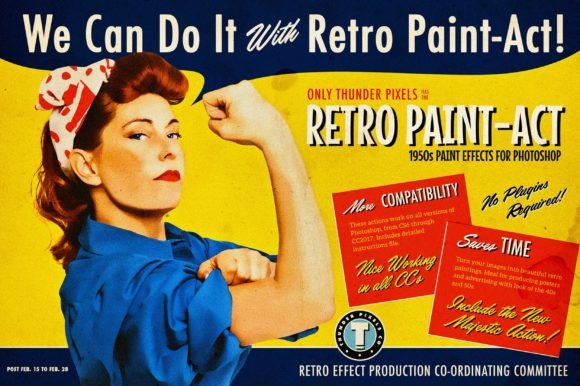
There is a distinct charm to the visual language of the mid-20th century. If you look at magazine advertisements or movie posters from the 1950s, you will notice a specific texture and depth that digital photography often lacks. This was an era when the process involved an artist taking a photograph and then manually painting over it to create a stylized, idealized reality. For modern designers, replicating this look used to require hours of manual brushwork and advanced masking skills. However, tools like Retro Paint-Act - PS Action Kit have democratized this aesthetic, allowing creators to achieve that vintage painterly effect with remarkable efficiency.
Why the 1950s Painterly Look Still Matters
The appeal of the 1950s advertising style goes beyond mere nostalgia. It represents a time when commercial art was hand-crafted, resulting in images that feel warm, tangible, and human. In today’s saturated digital landscape, where high-resolution, hyper-realistic imagery is the norm, a painted look can stop the scroll. It adds a layer of artistic interpretation that feels personal and curated.
Using Retro Paint-Act - PS Action Kit allows you to tap into this psychological trigger. Whether you are designing a book cover, a social media campaign, or a brand identity for a boutique coffee shop, this aesthetic communicates quality, heritage, and craftsmanship. It transforms a standard stock photo into a piece of art, giving your project a unique voice that stands out against the sterile perfection of modern digital assets.
Real-World Applications Across Industries
The versatility of this action kit means it is not limited to fine art projects. Various industries can leverage this tool to enhance their visual storytelling.
- Fashion and Lifestyle Brands: Imagine a clothing line that wants to evoke timeless elegance. By applying the Retro Paint-Act effect to their lookbook images, they can create a dreamy, editorial feel that resembles classic Vogue spreads from the post-war era. The softening of details and the addition of paper textures give the garments a romantic, aspirational quality.
- Music and Entertainment: Album covers and event posters benefit immensely from this style. A jazz band or a neo-soul artist might use these actions to create promotional materials that visually echo the golden age of vinyl. The gritty, ink-brush textures add an organic rawness that resonates with audiences seeking authenticity.
- Wedding and Portrait Photography: Photographers often seek ways to offer premium packages. Offering a "Vintage Art" edit using this kit can be a significant upsell. It turns a standard wedding portrait into a heirloom-quality piece that looks like it belongs in a gallery, appealing to couples who value tradition and artistic flair.
- Interior Design and Home Decor: Designers creating mood boards or marketing materials for rustic or mid-century modern interiors can use these actions to blend product photos seamlessly into artistic compositions. The included old paper textures help simulate the look of vintage catalog pages, adding context and atmosphere to the presentation.
Balancing Automation with Creative Control
One of the most significant strengths of Retro Paint-Act - PS Action Kit is its dual approach to workflow. Not all images are created equal, and a one-size-fits-all solution rarely yields professional results. This kit addresses that by offering two distinct sets of actions.
The first set is fully automated. This is ideal for rapid prototyping or when you are working with a large batch of images that have similar lighting and composition. You simply click and go, and the action handles the heavy lifting. This is perfect for social media managers who need to maintain a consistent aesthetic across dozens of posts without spending hours on each file.
However, the second group of actions is where the true power lies for serious designers. These actions allow you to control levels, shadows, and highlights. This granularity is crucial because the original 1950s technique relied heavily on the artist’s judgment of light and shadow. By adjusting these parameters, you can ensure that the painted effect respects the three-dimensional form of your subject. For example, if you are working with a high-contrast image, you might need to soften the shadows to prevent the paint effect from looking muddy. This level of control ensures a more optimal result that feels tailored to the specific source image rather than slapped on top of it.
Enhancing Realism with Additional Resources
A digital filter alone can sometimes look flat. To combat this, the kit includes a comprehensive suite of additional resources that ground the effect in reality. The inclusion of a PSD file with ten textures of old papers is particularly valuable. These textures add physical imperfections—stains, folds, and grain—that mimic the aging process of actual printed media from the 1950s.
Furthermore, the set of 20 Vintage Ink Brushes allows for manual touch-ups. No automated action is perfect, and there may be areas where the effect bleeds into unwanted spaces or misses key details. With these brushes, you can manually refine edges, add splatters for dynamic energy, or deepen shadows in specific areas. This hybrid workflow—combining automated actions with manual brushing—creates the most convincing results.
The kit also provides links to download twelve beautiful fonts from the 1950s. Typography is half the battle in achieving a vintage look. Pairing your painted image with an appropriate typeface completes the illusion, ensuring that the text does not clash with the visual style. Additionally, the simple demonstration video serves as a quick start guide, helping users personalize their effects without needing to scour through lengthy manuals.
The Role of the Majestic Filter
To further bridge the gap between digital manipulation and traditional art, the developers have incorporated the Majestic Filter for free. This is not just an add-on; it is a critical component for achieving realism. The Majestic Filter consists of a set of actions specifically designed to refine the output of the main Retro Paint-Act. It helps smooth out transitions and enhances the painterly quality, bringing the image closer to the appearance of actual oil or watercolor paintings from the 1950s.
It is important to note that while this filter significantly improves results, it is not a magic wand. It works best when used in conjunction with the other tools in the kit. Think of it as the final varnish on a painting—it protects and enhances, but it cannot fix a poorly composed underlying structure. Users should experiment with the intensity of the Majestic Filter to find the sweet spot where the image retains its photographic clarity while gaining the desired artistic softness.
Considerations Before You Begin
While Retro Paint-Act - PS Action Kit is powerful, it requires thoughtful application. The source image matters greatly. High-resolution images with good lighting and clear subjects yield the best results. Low-light or overly noisy photos may produce unpredictable artifacts when the paint effect is applied. Additionally, understanding the history of the style helps. Looking at actual 1950s advertisements can provide inspiration for color grading and composition, helping you make better decisions when adjusting the action settings.
Ultimately, this kit is a bridge between past and present. It allows modern creators to borrow the warmth and humanity of mid-century commercial art and apply it to contemporary projects. Whether you are a seasoned graphic designer or a hobbyist photographer, integrating these tools into your workflow can open up new creative possibilities and help you craft visuals that resonate on a deeper, more emotional level.