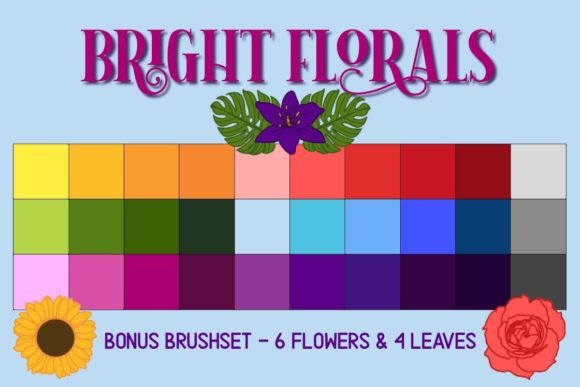
Bright Florals Procreate Swatches: A Practical Review for Digital Artists
Digital illustration offers limitless possibilities, yet one of the most common hurdles for artists is color selection. Spending hours tweaking hue, saturation, and brightness can disrupt creative flow. This is where curated resources like Bright Florals - Procreate Swatches become valuable tools. Designed not just as a utility but as a tribute to the natural beauty of flowers, this resource aims to streamline the coloring process while providing an emotionally resonant aesthetic. For artists aged 20 to 50 who are evaluating whether pre-made palettes fit their workflow, understanding the specific strengths and limitations of this tool is essential.
Understanding the Core Offering
At its heart, this product is a digital asset pack specifically engineered for the Procreate application on iPad. It includes two primary components: a .SWATCHES file containing thirty coordinated floral-inspired colors and a .BRUSHSET file featuring six flower stamps and four leaf stamps. The installation process is straightforward, requiring users to download a zip file, unzip it, and tap the respective files to import them directly into Procreate. Once installed, the colors appear in the palette selection, and the stamps become available in the brush library.
What distinguishes Bright Florals - Procreate Swatches from generic color packs is its thematic cohesion. The thirty colors are not random; they are curated to work together, mimicking the harmonious contrasts found in nature. This coordination reduces the cognitive load on the artist, allowing for quicker decision-making during the rendering phase. The inclusion of stamp brushes adds a layer of efficiency for those who need to populate backgrounds or add decorative elements without drawing each petal individually.
Evaluating Fit: Who Is This Resource For?
When comparing this resource against other options in the digital art market, it is crucial to identify the ideal user profile. This tool is best suited for illustrators, hobbyists, and designers who enjoy organic, vibrant aesthetics. If your work involves botanical illustrations, greeting card design, pattern creation, or whimsical character art, these swatches provide a ready-made foundation. The "fun and bright" descriptor suggests a high-saturation, cheerful vibe, which may not align with muted, dark, or realistic styles.
Consider the alternative: building a palette from scratch. While this offers total control, it requires a strong understanding of color theory and time. Pre-made palettes like Bright Florals offer speed and professional coordination. However, they sacrifice uniqueness. If you are working on a highly branded project with strict hex code requirements, a themed palette may require significant adjustment. Therefore, this resource is ideal for personal projects, client work with flexible guidelines, or rapid prototyping where mood matters more than precise color matching.
Comparing Approaches: Stamps vs. Hand-Drawn Elements
A key feature of this package is the bonus brushset with flower and leaf stamps. When evaluating this against purely manual drawing methods, there are clear tradeoffs. Stamps provide consistency and speed. For example, if you are creating a seamless pattern for fabric or wallpaper, using standardized leaf stamps ensures uniformity that is difficult to achieve by hand. They are also excellent for beginners who may struggle with botanical anatomy.
However, relying solely on stamps can lead to a repetitive look. Experienced artists often use stamps as a base, then modify them using Procreate’s transform and warp tools, or paint over them to add unique details. The value here lies in versatility. The four leaf and six flower stamps are not meant to replace drawing skills but to augment them. If you prefer complete artistic control over every stroke, you might find the stamps less useful, focusing instead on the color swatches alone. Conversely, if you prioritize output speed, the stamps significantly reduce production time.
Technical Requirements and Compatibility
Before purchasing or downloading any digital asset, verifying compatibility is vital. Bright Florals - Procreate Swatches requires an iPad with the Procreate application. It does not support Photoshop, Clip Studio Paint, or desktop-based software unless you are using a workaround to transfer assets, which is not officially supported. The file formats (.SWATCHES and .BRUSHSET) are native to Procreate, ensuring seamless integration without the need for third-party converters.
This specificity is both a strength and a limitation. For Procreate users, the experience is frictionless. The automatic installation means no complex folder navigation or manual import settings. For artists who switch between multiple platforms, this resource is locked into the Apple ecosystem. If you collaborate with team members using different software, you may need to manually recreate the palette in their preferred tool, which diminishes the convenience factor.
The Emotional and Creative Context
Beyond technical specifications, the backstory of this resource adds a layer of meaning that resonates with many creators. Dedicated to the memory of the creator’s mother, who loved flowers, the palette carries an intentional warmth. For many artists, the tools they use influence their mindset. Working with a palette that has a personal, heartfelt origin can inspire a more mindful and joyful creative process. This emotional connection is intangible but can be a deciding factor for artists seeking resources that feel authentic rather than mass-produced.
In practical terms, this translates to a cohesive visual language. The colors are likely tested for harmony, reducing the risk of clashing tones. When you select a pink from the palette, you can trust that the accompanying greens and yellows will complement it. This reliability is particularly beneficial for artists who suffer from "blank canvas syndrome" or decision fatigue. By removing the guesswork from color selection, you can focus on composition, storytelling, and technique.
Making an Informed Decision
To determine if Bright Florals - Procreate Swatches is the right choice for you, consider your current workflow challenges. Do you spend excessive time mixing colors? Do you struggle with creating balanced floral compositions? If so, this tool addresses those pain points directly. The combination of curated colors and ready-made stamps offers a comprehensive solution for floral-themed projects.
However, if your style leans towards monochrome, cyberpunk, or hyper-realism, this bright floral theme may not integrate well into your existing library. Additionally, if you already own several floral brush sets, evaluate whether the specific shade range and stamp designs offer something new. Look at the preview images carefully. Are the flowers stylized or realistic? Do the colors match your typical subject matter?
Ultimately, this resource is a specialized tool rather than a universal necessity. It excels in its niche: bright, cheerful, floral digital art on iPad. For artists within this niche, it provides efficiency, aesthetic coherence, and a touch of personal inspiration. For others, it may serve as a supplementary addition rather than a core toolkit component. By weighing the ease of use against the specificity of the style, you can make a choice that enhances rather than clutters your digital studio.
Remember, the best tools are those that disappear into the background, allowing your creativity to take center stage. Whether through the quick application of a leaf stamp or the confident selection of a harmonious green, Bright Florals - Procreate Swatches aims to facilitate that seamless creative experience. Go forth and create, keeping in mind that the right resources should support your vision, not define it.