Knit Texture Procreate Brush Guide
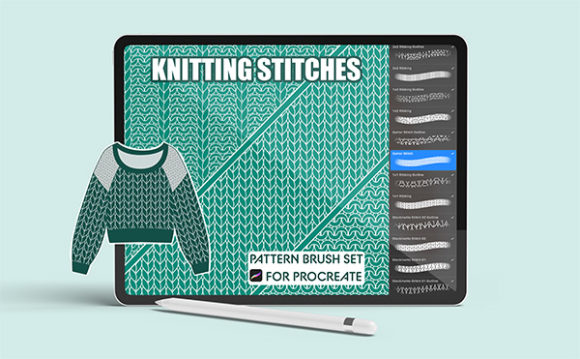
Digital illustration has evolved far beyond flat colors and simple gradients. For artists working in fashion, product design, or editorial content, texture is the bridge between a concept and a tangible reality. The Knit Texture Procreate Brush set serves as a specialized tool designed to replicate the intricate details of woven fabrics directly on an iPad. Unlike generic texture overlays, this digital .brushset file integrates seamlessly into the Procreate app, allowing for dynamic resizing and recoloring to match specific project needs.
Understanding whether this tool fits your workflow requires looking beyond the feature list. It is about evaluating how digital efficiency intersects with artistic authenticity. Whether you are drafting a technical pack for a manufacturer or creating a cozy background for a lifestyle blog, the utility of these brushes varies significantly based on your end goal.
What Is Inside the Knitting Stitches Set?
This collection is not a random assortment of patterns but a curated selection of fundamental knitting structures. The set includes five distinct styles that cover the majority of standard garment constructions:
- Stockinette Stitch: The classic smooth "V" pattern found on the front of most sweaters.
- Garter Stitch: The bumpy, ridged texture created by knitting every row.
- 1x1 Ribbing: Alternating knit and purl stitches, often used for cuffs and collars.
- 1x2 Ribbing: A variation offering a slightly wider vertical stretch appearance.
- Alternate Stockinette: A stylistic variation that provides visual diversity for detailed illustrations.
Each brush is fully adjustable. Users can modify the scale via the grain settings in the brush menu, ensuring the stitch size looks realistic whether applied to a close-up detail or a full-body garment sketch. Because they are native Procreate brushes, they respond to pressure and tilt, adding a layer of organic imperfection that static images lack.
Perspectives from Fashion Professionals and Designers
For fashion designers and technical illustrators, speed and accuracy are paramount. Creating a fashion tech pack manually involves hours of drawing repetitive lines to simulate fabric weight and weave. This process is prone to inconsistency. The Knit Texture Procreate Brush allows professionals to generate uniform textures instantly.
Consider a designer submitting a knitwear line to a manufacturer. Clarity is essential. Using the 1x1 Ribbing brush for cuffs and the Stockinette Stitch for the body communicates construction details without ambiguity. The ability to recolor these strokes means the same brush can represent wool, cotton, or synthetic blends simply by changing the hue and opacity. This flexibility reduces revision time and helps maintain a clean, professional presentation in digital portfolios.
Value for Digital Artists and Illustrators
Creative illustrators often face the challenge of making digital art feel tactile. A flat vector sweater can look sterile. By integrating knitting stitches into character designs or editorial pieces, artists add depth and warmth. This is particularly relevant for creators working on children’s books, holiday-themed campaigns, or lifestyle branding where coziness is a key emotional driver.
The learning curve here is minimal. Since the brushes work directly within Procreate, there is no need to master complex layer blending modes or external software. An illustrator can paint a base shape and then stamp or stroke the texture over it. The result is a hybrid approach that combines the precision of digital tools with the aesthetic appeal of traditional crafts. For freelancers, this efficiency translates to faster turnaround times for clients who request detailed, textured assets.
Practical Applications for Entrepreneurs and Small Business Owners
Small business owners, particularly those in e-commerce or print-on-demand sectors, benefit from high-quality mockups. When selling digital products or physical apparel online, the product image must convey quality. A generic mockup may not showcase the unique texture of a custom design.
Using the Garter Stitch or Alternate Stockinette brushes, entrepreneurs can create creative product mockups that highlight specific design elements. For example, a seller of digital planning stickers might use these brushes to create themed seasonal packs. A boutique owner could use them to design social media graphics that announce new arrivals, giving followers a sensory hint of the product’s material before they even touch it. This visual cue can enhance perceived value and drive engagement.
Educational and Hobbyist Uses
Educators teaching digital art or fashion design can use this set to demonstrate how texture influences perception. It serves as a practical example of how digital tools can mimic physical processes. Students learn not just how to draw a sweater, but how to construct it visually using correct stitch patterns. This builds foundational knowledge that applies to both digital and traditional mediums.
For hobbyists and knitters themselves, these brushes offer a new way to document and share their craft. A knitter might sketch a pattern idea before buying yarn, experimenting with color combinations digitally using the 1x2 Ribbing and Stockinette brushes. This low-cost trial method prevents waste and encourages creativity. It allows enthusiasts to visualize complex cable or rib patterns without committing to hours of physical labor.
Technical Considerations and Limitations
It is crucial to note that this is a .brushset file exclusive to the Procreate app on iPad. It will not function in Adobe Photoshop, Clip Studio Paint, or other desktop software. This limitation defines the user base: if your workflow is entirely desktop-based, this tool will not integrate. However, for those already invested in the Apple ecosystem, the performance is optimized for touch interfaces.
To adjust the brush size, users must navigate to the brush studio, select "Grain," and adjust the scale slider. This step is simple but essential for achieving realism. A stockinette stitch that is too large may look like a cartoon, while one that is too small may lose definition on smaller screens. Finding the right balance requires minor experimentation, but the immediate feedback loop in Procreate makes this process intuitive.
Assessing Fit for Your Workflow
Deciding whether to incorporate the Knit Texture Procreate Brush into your toolkit depends on three factors: platform, project type, and aesthetic goals.
- Platform: Do you use an iPad with Procreate? If yes, the integration is seamless. If no, this tool is incompatible.
- Project Type: Are you creating fashion illustrations, tech packs, or textured backgrounds? These brushes excel in structured, repetitive patterns. They are less suitable for abstract or freeform organic textures.
- Aesthetic Goals: Do you need realistic fabric representation? If your style is hyper-realistic or technical, these brushes provide the necessary detail. If your style is minimalist or flat, they may be unnecessary.
For beginners, the value lies in the shortcut it provides to achieving professional-looking results. For experts, the value is in the time saved during repetitive tasks. For businesses, the value is in the enhanced visual communication with customers and manufacturers.
Ultimately, the Knit Texture Procreate Brush is more than a decorative element. It is a functional asset that bridges the gap between digital efficiency and textile authenticity. By understanding the specific stitches included and their adjustable nature, users can determine if this tool aligns with their creative or commercial objectives. Whether enhancing a tech pack or adding warmth to a digital illustration, these brushes offer a precise, versatile solution for modern digital creators.