Dark Brush Strokes: A Practical Guide for Digital Crafters and Designers
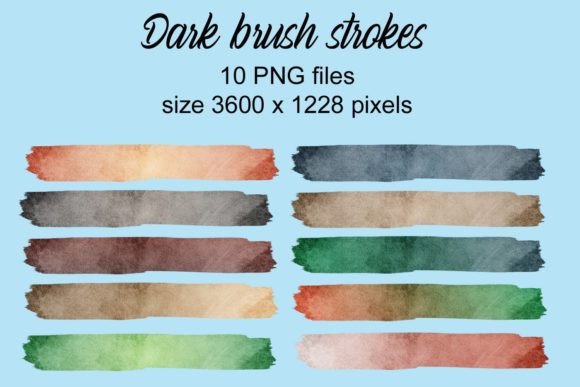
In the evolving landscape of digital design, texture plays a pivotal role in bridging the gap between sterile digital files and organic, handcrafted aesthetics. Dark Brush Strokes represents a curated collection designed to address this specific need. Comprising ten distinct brush strokes in varying colors, this asset pack offers designers, hobbyists, and small business owners a streamlined way to incorporate artistic flair into their projects. Understanding the technical specifications, potential applications, and inherent limitations of such resources is essential for making an informed decision about whether they align with your creative workflow.
Understanding the Asset Collection
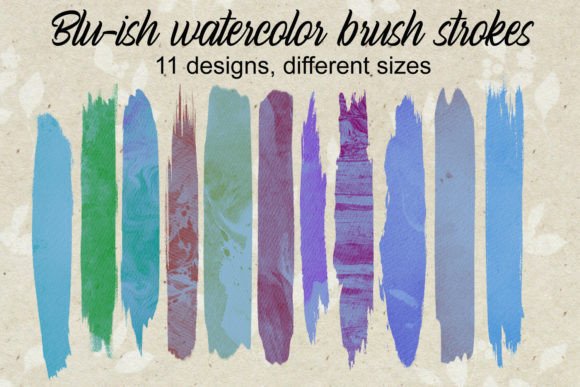
At its core, Dark Brush Strokes is a digital resource pack containing ten individual brush stroke elements. Unlike complex vector libraries or extensive pattern sets, this collection focuses on simplicity and versatility. Each stroke is rendered in a different color, providing a immediate palette variety without requiring extensive post-processing colorization by the user. The visual style leans towards bold, expressive marks that can serve as backgrounds, accents, or framing devices.
The technical foundation of these assets is crucial for their usability. Each brush stroke is provided at a resolution of 3600 × 1228 pixels. This high-resolution format ensures that the images retain clarity when scaled down for small items like planner stickers or when printed on medium-sized surfaces such as mugs and tumblers. The aspect ratio is notably wide, which influences how these elements can be integrated into layouts, favoring horizontal compositions or cropped segments for square formats.
Primary Applications and Use Cases
The versatility of Dark Brush Strokes makes it suitable for a wide array of crafts and design projects. Evaluating where these assets fit best requires looking at common industry practices in digital crafting and print-on-demand services.
- Invitations and Stationery: The organic nature of brush strokes adds a touch of elegance and personalization to wedding invitations, birthday cards, and event programs. They can serve as subtle backgrounds or bold headers.
- Scrapbooking Elements: For digital scrapbookers, these strokes provide quick decorative layers that mimic traditional paint or ink, adding depth to photo layouts without the mess of physical media.
- Planner Stickers: The high resolution allows for crisp printing on sticker paper. Users can crop the wide strokes into smaller segments to create washi tape designs or decorative dividers.
- Sublimation Projects: Items such as mugs, tumblers, and phone cases benefit from the high pixel density. The dark tones of the brushes contrast well against light-colored substrates, ensuring the design remains visible after the heat transfer process.
- Font and Typography Pairings: When combined with handwritten or serif fonts, these strokes can underline titles or frame text, creating a cohesive brand aesthetic for social media graphics or logos.
Evaluating Benefits and Tradeoffs
When considering Dark Brush Strokes for your toolkit, it is important to weigh the advantages against potential limitations. A balanced evaluation helps prevent mismatched expectations.
Advantages
The primary benefit of this collection is efficiency. Creating realistic brush strokes from scratch requires significant skill in digital painting software and time to refine edges and opacity. Having pre-made, high-quality assets allows creators to bypass this learning curve and focus on layout and composition. Additionally, the inclusion of ten different colors reduces the need for immediate color adjustment, although further customization is always possible.
Another advantage is the resolution quality. At 3600 pixels wide, these images are versatile enough for both web use and high-quality print. This dual utility makes them a cost-effective investment for designers who work across multiple mediums.
Considerations and Limitations
However, there are tradeoffs. The fixed aspect ratio of 3600 × 1228 pixels means that using these strokes in square or vertical formats requires cropping. While this is not inherently negative, it does mean that users must be comfortable with image editing software to isolate the parts of the stroke they wish to use. Furthermore, because these are raster images (pixels) rather than vectors, they cannot be scaled up infinitely without loss of quality. While 3600 pixels is sufficient for most consumer-grade prints, it may not meet the requirements for large-format signage or billboards.
Additionally, the "dark" theme implies a specific aesthetic. While versatile, these strokes may require blending mode adjustments (such as "Multiply" or "Overlay") to integrate seamlessly with lighter backgrounds, which adds a minor step to the workflow for beginners.
Decision-Making Insights: Is This Right for You?
Determining whether Dark Brush Strokes aligns with your goals depends on your current project needs and technical comfort level. This collection is a strong fit if you are a small business owner selling personalized goods, such as custom mugs or invitation suites, where speed and consistency are valuable. It is also ideal for digital planners who want to add artistic elements without mastering digital painting techniques.
Conversely, alternatives may be worth considering if your work primarily involves large-scale commercial printing where vector scalability is mandatory. In such cases, SVG brush sets might offer more flexibility. Similarly, if you require a vast library of textures with intricate details beyond simple strokes, a comprehensive texture pack might provide better value. If you prefer complete control over every curve and taper of a brush mark, investing time in learning Procreate or Photoshop brush engines might be more beneficial than purchasing pre-made assets.
Practical Tips for Integration
To maximize the value of Dark Brush Strokes, consider the following practical approaches:
- Experiment with Blending Modes: Do not simply place the stroke on top of your background. Try using blending modes like Multiply, Overlay, or Soft Light to allow the texture of the underlying layer to show through, creating a more integrated look.
- Crop Strategically: Given the wide aspect ratio, do not hesitate to crop the strokes. A small section of a large stroke can often look more dynamic and less repetitive than using the entire image.
- Layering: Combine multiple strokes from the collection. Overlapping two different colors at reduced opacity can create unique, custom hues and add depth to your design.
- Check Print Requirements: Before finalizing sublimation or print projects, ensure that the 300 DPI standard is met at your desired print size. At 3600 pixels, you can print approximately 12 inches wide at high quality, which covers most standard mug wraps and tumbler designs.
Conclusion
Dark Brush Strokes offers a focused, high-quality solution for adding organic texture to digital and print projects. Its strength lies in its simplicity, high resolution, and immediate usability across various crafts, from scrapbooking to sublimation. By understanding its technical constraints and leveraging its aesthetic strengths, creators can efficiently enhance their designs. Whether you are a seasoned designer looking to speed up your workflow or a hobbyist aiming to elevate your handmade goods, this collection provides a reliable foundation for creative expression. Carefully assess your specific project requirements regarding scale and format to ensure these assets serve your artistic vision effectively.