Evaluating Vintage Calligraphy Clipart Brushes V2 for Digital and Print Design Workflows
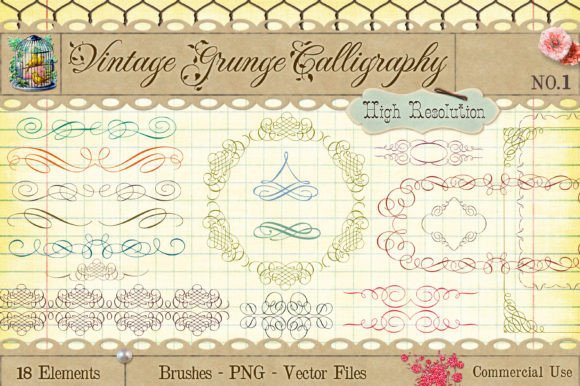
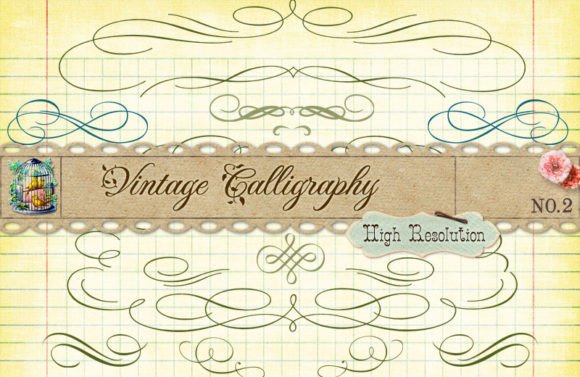
For graphic designers, digital artists, and craft enthusiasts, the search for high-quality decorative elements often leads to a crossroads between convenience and versatility. Vintage Calligraphy Clipart Brushes V2 represents a specific approach to this challenge, bundling static vector ornaments with dynamic Photoshop brushes. This combination aims to serve users who need both precise, scalable graphics for print and fluid, organic strokes for digital painting. Understanding whether this package fits your workflow requires looking beyond the aesthetic appeal of the twenty included vintage decorative calligraphy ornaments and examining the technical specifications that define their utility.
The core value proposition of this resource lies in its multi-format delivery. By providing files in AI, PDF, SVG, and PNG formats, alongside specialized Photoshop brushes, the creator acknowledges that modern design projects rarely stick to a single medium. However, each format comes with distinct advantages and limitations that can significantly impact your production timeline and final output quality.
The Advantage of Solid Black Vector Elements
One of the most practical features of the Vintage Calligraphy Clipart Brushes V2 is that all elements are provided as solid black shapes. For designers accustomed to working with complex, multi-colored stock assets, this might initially seem like a limitation. In reality, it is a significant efficiency booster. Solid black vectors act as stencils or masks, allowing you to recolor them instantly to match any brand palette or project theme without dealing with unwanted gradients, shadows, or embedded textures.
This approach is particularly beneficial for logo design, branding kits, and monogram creation. When you import these AI or PDF files into Adobe Illustrator or similar vector software, you can expand the shapes and apply global colors. This ensures that if a client requests a color change later in the process, you can update it across all instances with a single click. Compared to raster-based clipart, which may pixelate when resized or require tedious manual recoloring, these vector files maintain crisp edges at any scale.
Navigating File Formats: AI, PDF, and SVG
The inclusion of AI, PDF, and SVG files caters to different segments of the creative community. The AI and PDF formats are ideal for professional designers using Adobe Creative Cloud. These files preserve layer structures and editing capabilities, making them suitable for high-end print work where precision is paramount. The fact that all shapes are contained within one document simplifies library management, reducing the clutter of managing twenty separate files for simple projects.
However, the SVG format introduces a different set of considerations. Scalable Vector Graphics are essential for web design and certain cutting machine applications. Yet, it is crucial to note a specific limitation mentioned in the product details: some of the files in the SVG version may be too complex for standard cutting machines. Intricate calligraphy often involves fine lines, tight curves, and overlapping paths. While a laser cutter or high-end plotter might handle these details, consumer-grade vinyl cutters or paper crafters may struggle with weeding or cutting accuracy. If your primary goal is physical crafting with a desktop cutter, you may need to simplify these paths manually or opt for less intricate designs from other collections.
The Role of Transparent PNGs and Photoshop Brushes
Not every user works with vector software. For photographers, social media managers, and hobbyists, the twenty PNG files with transparent backgrounds offer immediate usability. These raster images allow for drag-and-drop placement in tools like Canva, Microsoft Word, or Procreate. While they lack the infinite scalability of vectors, they are perfectly adequate for web graphics, digital invitations, and screen-based content where resolution requirements are moderate.
The addition of Photoshop Brushes distinguishes Vintage Calligraphy Clipart Brushes V2 from standard clipart packs. Brushes transform static ornaments into dynamic tools. Instead of placing a pre-made flourish, you can paint it onto your canvas, adjusting size, opacity, and flow in real-time. This is invaluable for creating custom compositions that feel hand-drawn rather than assembled. It allows for variation in stroke weight and direction, adding a human touch that rigid vector placements sometimes lack. For digital painters, these brushes can serve as underlays or overprints, adding texture and depth to typography projects.
Comparing Approaches: Static Clipart vs. Dynamic Brushes
When evaluating this product, it is helpful to compare it against two common alternatives: pure brush sets and pure vector libraries. Pure brush sets offer maximum flexibility in shape and form but often lack the refined, polished look of a carefully crafted vector ornament. They require a steady hand and artistic skill to use effectively. On the other hand, pure vector libraries provide perfect geometry but can feel repetitive if used without modification.
Vintage Calligraphy Clipart Brushes V2 attempts to bridge this gap. The vector ornaments provide the "perfect" base shapes for formal designs, while the brushes offer the spontaneity needed for artistic expression. This hybrid approach is best suited for users who toggle between structured layout design and freeform digital art. If you strictly do one or the other, you might find half of the package redundant. However, for full-service designers who handle both branding (vectors) and social media content creation (brushes/PNGs), the dual nature of the pack offers considerable value.
Decision Factors and Best-Fit Scenarios
To determine if this resource is the right choice for your needs, consider the following decision factors:
- Software Proficiency: Do you have access to vector editing software? If not, the AI and SVG files will be less useful, though the PNGs and brushes remain accessible.
- Output Medium: Are you designing for print or screen? Vectors are superior for large-format print, while PNGs and brushes excel in digital environments.
- Complexity Tolerance: If you plan to use these with cutting machines, be prepared to potentially simplify paths. If you are comfortable with minor technical adjustments, the complexity adds to the vintage aesthetic.
- Customization Needs: If you require exact color matching and scalability, the solid black vector approach is ideal. If you prefer ready-to-use colors, you will need to invest time in recoloring.
This package is particularly well-suited for wedding invitation designers, boutique branding specialists, and digital journal creators. The vintage aesthetic aligns well with industries that value tradition, elegance, and craftsmanship. Conversely, if you are working on ultra-modern, minimalist tech branding, the ornate nature of these calligraphy elements may clash with your design language, regardless of their technical quality.
Limitations and Practical Considerations
While versatile, Vintage Calligraphy Clipart Brushes V2 is not a universal solution. The complexity of the SVG files means they are not "plug-and-play" for all crafting hardware. Users should test a single file with their specific machine before committing to a large project. Additionally, the solid black format requires an extra step in the workflow for those who want colored elements immediately. This is a minor trade-off for the flexibility it provides, but it does require a basic understanding of layer styles or vector coloring techniques.
Furthermore, the style is distinctly vintage. While classic, it may not suit contemporary trends that favor bold, sans-serif typography or abstract geometric shapes. Always consider the longevity of the style in relation to your target audience. Vintage calligraphy tends to have a longer shelf life in traditional sectors but may feel dated in fast-moving digital trends unless used ironically or sparingly.
In conclusion, Vintage Calligraphy Clipart Brushes V2 offers a robust toolkit for designers who value flexibility. By combining precise vector ornaments with expressive brushes and ready-to-use PNGs, it addresses multiple stages of the design process. Success with this product depends on matching its technical strengths—scalable vectors and customizable brushes—to your specific project requirements, while being mindful of the complexity limitations for physical crafting applications.