Integrating Watercolor Brush Assets into Modern Digital Design Workflows
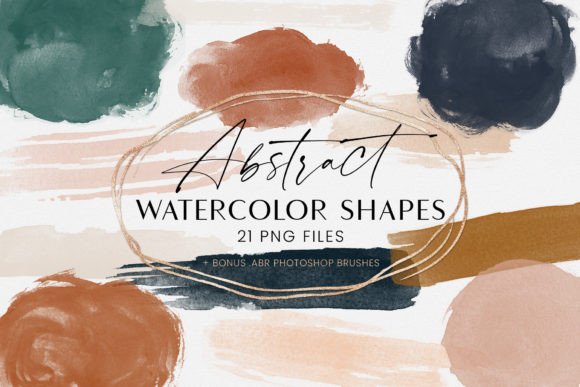
In the evolving landscape of digital art and graphic design, the demand for organic, hand-crafted aesthetics has never been higher. Designers are increasingly moving away from sterile, vector-perfect lines in favor of textures that convey warmth, imperfection, and human touch. This is where a high-quality Watercolor Brush set becomes an invaluable resource. Specifically, collections featuring various colors ready to be used as an addition to your design, often delivered as 20-element PNG files, offer a unique bridge between traditional media and digital efficiency. Understanding how these assets function, where they excel, and how they compare to other tools is essential for making an informed decision about your creative toolkit.
Defining the Digital Watercolor Brush Asset
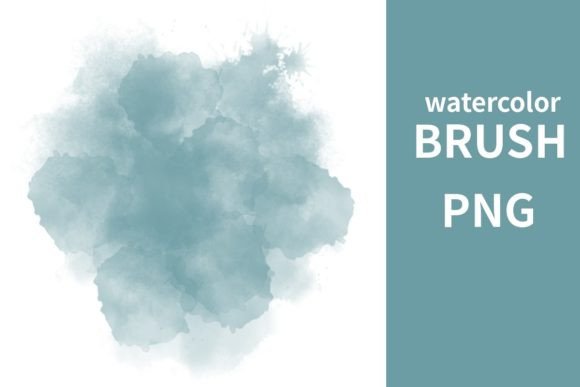
When we refer to a Watercolor Brush in this context, we are not necessarily talking about a software plugin or a dynamic brush engine within programs like Photoshop or Procreate. Instead, we are discussing pre-rendered digital assets—static images saved in PNG format with transparent backgrounds. These files capture the specific bleed, granulation, and edge variation of real watercolor paint applied to paper.
The distinction lies in the immediacy. Unlike dynamic brushes that require pressure sensitivity settings, flow adjustments, and layer blending modes to simulate realism, PNG assets are "what you see is what you get." A pack containing 20 elements typically includes a curated variety of strokes, splatters, washes, and blooms. Each element is isolated on transparency, allowing designers to drag, drop, resize, and recolor them instantly. This format removes the technical barrier of mastering complex brush dynamics, making it accessible to both seasoned illustrators and hobbyists who want professional results without a steep learning curve.
Comparing Static PNGs vs. Dynamic Brush Engines
To evaluate whether a Watercolor Brush PNG pack is the right choice, it is helpful to compare it against dynamic brush engines. Both approaches aim to replicate the fluidity of water-based media, but they serve different workflows.
- Control and Consistency: Dynamic brushes offer infinite variability. Every stroke is unique based on speed and pressure. However, this unpredictability can be a drawback when a designer needs a specific shape or composition. PNG assets provide consistency. If you need a specific splash in the corner of a layout, you can place the exact same element repeatedly, ensuring visual harmony across multiple pages or screens.
- Performance and Speed: High-resolution dynamic brushes can be resource-intensive, slowing down older hardware. In contrast, PNG files are static images. While high-resolution PNGs do take up storage space, they do not require real-time calculation by the software’s rendering engine. This makes them ideal for quick mockups, social media graphics, and web design where speed is prioritized over procedural generation.
- Learning Curve: Mastering a digital watercolor engine requires understanding layer masks, opacity, wet edges, and color mixing. Using a PNG pack requires only basic knowledge of layering and transformation tools. For professionals working under tight deadlines, the latter offers a significant efficiency advantage.
Evaluating the 20-Element File Structure
The specification of "20 Element File format PNG" suggests a curated rather than exhaustive collection. This limitation is actually a strength for many users. Massive libraries with hundreds of brushes can lead to decision paralysis. A focused set of 20 elements forces the designer to be intentional. Typically, such a pack will include:
- Broad Washes: Large, soft-edged shapes suitable for backgrounds or blocking out color fields.
- Detailed Strokes: Thinner, more defined lines that mimic the tip of a round brush, useful for accents or framing.
- Texture Splatters: Small droplets and specks that add grit and realism, breaking up clean digital lines.
- Blooms and Bleeds: Irregular shapes where pigment has pooled, adding organic complexity to flat areas.
When evaluating these packs, check the resolution. Since these are raster images, scaling them up beyond their original dimensions will result in pixelation. Ensure the PNGs are provided at a high enough DPI (dots per inch) for your intended use, whether that is print or high-definition screens.
Best-Fit Situations for Watercolor PNGs
There are specific scenarios where using a Watercolor Brush asset pack is superior to painting from scratch or using vectors.
Brand Identity and Packaging: Brands seeking an artisanal, handmade, or eco-friendly image often utilize watercolor textures. PNG assets allow for rapid iteration of logo variations and packaging labels. You can easily test different color palettes by using blending modes like "Multiply" or "Overlay" to tint the grayscale or colored PNGs to match brand guidelines.
Wedding and Event Stationery: This industry relies heavily on floral and soft aesthetic motifs. A 20-element pack provides enough variety to create unique invitations without requiring the designer to paint each flower individually. The transparency of PNGs allows these elements to be layered over textured paper backgrounds seamlessly.
Web and UI Design: Adding subtle watercolor splashes behind call-to-action buttons or headers can soften the rigid grid structure of web layouts. Because PNGs are lightweight compared to video or complex animated elements, they contribute to a rich visual experience without significantly impacting load times, provided they are optimized correctly.
Limitations and When to Choose Alternatives
Despite their convenience, static PNG assets have inherent limitations. The most significant is the lack of true interactivity. You cannot change the direction of the stroke or the flow of the paint after the file is created. If you need a stroke that wraps around a specific 3D object or follows a complex, custom path, a dynamic brush or vector tool is a better alternative.
Furthermore, color customization has limits. While you can tint a PNG, you cannot easily separate the pigment from the paper texture if they are baked into the same layer. If the asset includes a white paper background that was not properly removed, it will not blend well with non-white designs. Always verify that the PNGs have true transparency before purchasing or downloading.
If your goal is to create a large-scale mural or a highly detailed illustration where every brushstroke must respond to your hand movement in real-time, investing time in learning a dynamic brush engine is more appropriate. PNG packs are compositional tools, not painting tools.
Making the Right Choice for Your Project
Choosing between a Watercolor Brush PNG pack and other methods depends on your project’s scope, timeline, and desired aesthetic. Ask yourself the following questions:
- Do I need speed and consistency, or unique, spontaneous variation?
- Am I comfortable with layer blending modes and masking?
- Is the final output print or digital? (Check resolution requirements).
- Do I need to edit the shape of the brushstroke after placement?
For most commercial design tasks, marketing materials, and digital content creation, the efficiency of a 20-element PNG pack outweighs the flexibility of dynamic brushes. It allows designers to inject organic warmth into their work without sacrificing productivity. By understanding the tradeoffs, you can integrate these assets strategically, using them to enhance rather than replace your core design skills. The key is to view these files not as a shortcut, but as a specialized component in a broader, versatile design workflow.