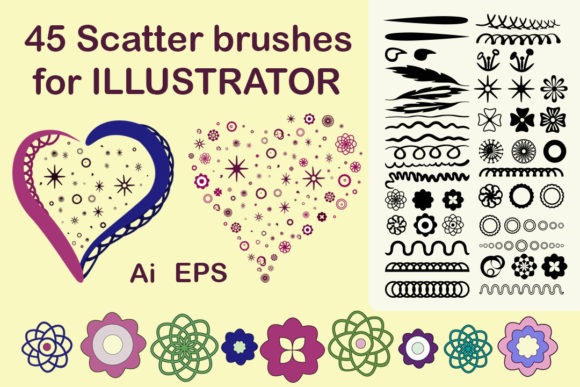
45 Scatter Brushes for Illustrator
Creative workflows often stall not because of a lack of skill, but due to the time-consuming nature of building intricate details from scratch. When you are designing a complex invitation suite or a textured brand identity, manually placing individual decorative elements can drain hours from your schedule. This is where specialized tools like 45 Scatter Brushes for Illustrator become essential assets in a designer’s digital toolkit. These resources are not merely shortcuts; they are foundational elements that allow for rapid iteration and consistent aesthetic quality across various media.
The core value of this collection lies in its versatility and ease of integration. Delivered as a single zip file containing brushes specifically optimized for Adobe Illustrator CC, this set streamlines the process of adding organic, scattered textures to your work. Unlike standard pattern fills which can look rigid and repetitive, scatter brushes distribute artwork along a path with natural variation. This creates a hand-drawn feel that resonates with modern audiences who appreciate authenticity in visual communication. Whether you are a seasoned graphic designer or a small business owner managing your own marketing materials, understanding how to leverage these tools can significantly elevate the perceived value of your output.
Enhancing Efficiency Without Sacrificing Quality
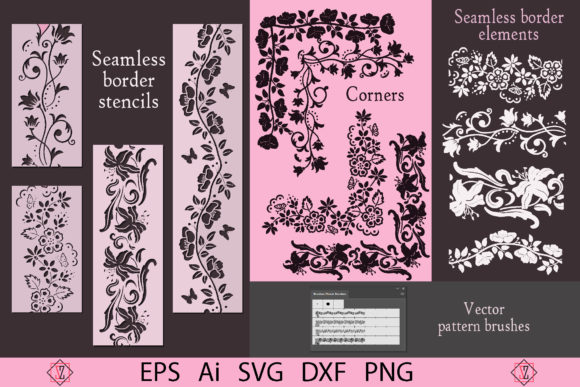
One of the most immediate benefits of using Scattered decorative brushes for Adobe Illustrator is the drastic reduction in production time. Consider the task of creating a floral border for a wedding invitation. Traditionally, this might involve selecting individual flower vectors, rotating them, adjusting their sizes, and spacing them evenly—a process that requires meticulous attention to detail. With scatter brushes, you simply draw a path, apply the brush, and let the software handle the distribution. The result is a complex, visually appealing design achieved in seconds rather than hours.
This efficiency does not come at the cost of control. All of these discrete Illustrator brushes are fully adjustable in size and shape via Adobe Illustrator’s native tools. You can edit, change the size, or modify the color of each element to match your specific project requirements. This flexibility ensures that while the initial application is fast, the final output remains bespoke and tailored to your unique vision. For freelancers working against tight deadlines, this balance of speed and customization is invaluable.
Versatility Across Print and Digital Media
The utility of this brush set extends far beyond simple document decoration. Because the brushes are vector-based, they scale infinitely without losing resolution. This makes them ideal for a wide range of applications, from small business cards to large-format posters and prints. The set includes an EPS 10 format vector file, ensuring compatibility with other vector programs if you do not use Adobe Illustrator exclusively. This cross-platform compatibility is crucial for agencies that may need to share assets with clients using different software ecosystems.
For entrepreneurs and marketers, these brushes offer a cost-effective way to create high-end branding materials. Imagine designing packaging for a boutique product line. By incorporating these scattered decorative elements, you can add a layer of sophistication and texture that distinguishes your brand from competitors relying on stock photography or generic templates. The brushes are equally effective for textile design, such as creating patterns for pillows or t-shirts, where repeating motifs need to feel organic rather than mechanical.
Who Benefits Most From This Toolkit?
While any creative professional can benefit from expanded resources, certain groups will find 45 Scatter Brushes for Illustrator particularly transformative. Educators and students in graphic design programs can use these brushes to study composition and texture without getting bogged down in technical execution. Bloggers and content creators who produce their own visual assets can enhance their social media graphics and ebook covers with professional-grade embellishments.
Publishers and small business owners will also appreciate the practicality of this tool. Creating eye-catching covers for reports, magazines, or product catalogs often requires unique decorative elements. Instead of hiring an illustrator for every minor detail, you can build a library of custom designs using these brushes. This empowers non-designers to produce polished, professional-looking materials that align with their brand identity.
Technical Considerations and Best Practices
To get the most out of this resource, it is important to understand its technical requirements. Please note that all flexible brushes are designed specifically for Adobe Illustrator, not Photoshop. While both are Adobe products, they handle vector and raster data differently. Ensure you have Adobe Illustrator CC or later installed before purchasing. Checking your software version beforehand prevents compatibility issues and ensures a smooth installation process.
When working with scatter brushes, experimentation is key. Start by applying the brush to a simple path and then explore the Brush Options panel. Adjusting parameters such as spacing, rotation, and size variation can dramatically change the character of the stroke. For instance, increasing the rotation randomness can create a more chaotic, natural look, while limiting it produces a more structured, formal appearance. These subtle adjustments allow you to create your own design elements that are perfect for your project, ensuring that no two applications look exactly the same.
Integrating Brushes Into Your Creative Workflow
Incorporating new tools into your workflow requires a shift in mindset. Rather than viewing brushes as pre-made solutions, think of them as raw materials. The true power of Scattered decorative brushes for Adobe Illustrator emerges when you combine them with other techniques. Try using the brushes to create masks, clipping paths, or background textures. Layer multiple brush strokes with varying opacities to build depth and complexity.
For logo designers, these brushes can serve as inspiration for custom iconography. While you may not use the brush directly in a final logo mark due to scalability concerns, you can trace over the generated shapes to create clean, unique vector forms. This approach allows you to leverage the organic feel of the brush while maintaining the precision required for corporate branding.
Support and Community
Investing in digital tools is not just about the files you receive; it is also about the support behind them. If you have any questions about the product, dedicated assistance is available. Tatyana, the creator, is happy to help resolve any issues you may encounter during installation or usage. This level of customer care ensures that you are never left stranded if you run into technical difficulties.
Thank you for visiting my store and considering this resource for your creative projects. By integrating 45 Scatter Brushes for Illustrator into your workflow, you are investing in a tool that promotes efficiency, enhances creativity, and supports the production of high-quality visual content. Whether you are decorating invitations, designing business cards, or creating intricate illustrations, these brushes provide the flexibility and beauty needed to bring your ideas to life.
Remember, the goal of any design tool is to remove friction between your idea and its execution. With this collection, you gain the ability to produce sophisticated, textured designs with minimal effort, freeing up more time to focus on strategy, storytelling, and the broader aspects of your creative projects. Embrace the potential of vector-based scatter brushes and discover how they can transform your approach to digital design.