Easel Mockup with Paints and Brushes
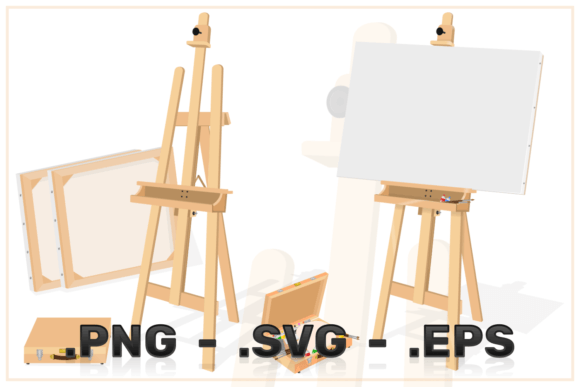
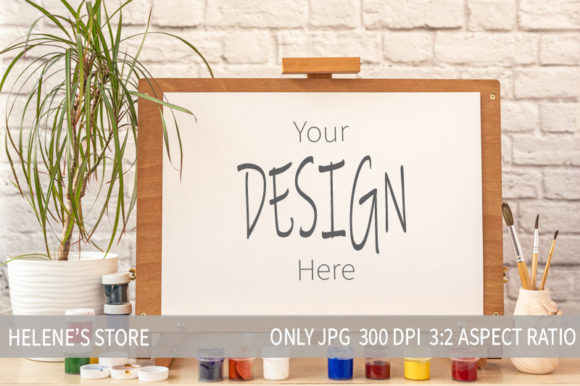
Presenting your digital artwork in a way that feels tangible and authentic is one of the most effective ways to connect with an audience. The Easel Mockup with Paints and Brushes offers a sophisticated solution for artists, designers, and marketers who want to showcase their work without the logistical headaches of traditional product photography. This digital asset features a classic wooden easel resting on a desk, surrounded by artistic tools, creating an immediate sense of creativity and craftsmanship. By leveraging this high-resolution resource, you can transform flat digital files into compelling visual stories that resonate with viewers.
The Value of Digital Presentation
In today’s fast-paced creative economy, time is a non-renewable resource. Setting up a physical photoshoot requires props, lighting equipment, backdrops, and hours of editing to get the shadows and reflections just right. For many freelancers and small business owners, this process is not only expensive but also inconsistent. A digital mockup eliminates these variables entirely. It provides a controlled, professional environment where your design remains the focal point.
Using a digital mockup allows you to maintain brand consistency across all your platforms. Whether you are posting on social media, updating your portfolio, or creating promotional materials for an online store, the visual quality remains pristine. The included file is a high-resolution JPG at 3600x2400 pixels, with a resolution of 300dpi. This ensures that your images look sharp on retina displays and print-ready if needed. The 3:2 aspect ratio is versatile, fitting well into various web layouts and presentation formats.
Creative Applications for Designers and Artists
The versatility of the wooden easel scene opens up numerous creative possibilities. It is not limited to traditional oil paintings; it serves as a perfect stage for a wide range of digital creations.
- Digital Illustrations: If you create character designs or concept art, placing them on the easel gives them a sense of prestige and completion.
- Print-on-Demand Previews: Show potential customers how your art looks in a home setting. This context helps buyers visualize the piece in their own spaces, increasing conversion rates.
- Work-in-Progress Shots: Share snippets of your creative process. The surrounding paints and brushes suggest ongoing work, which can engage followers who enjoy behind-the-scenes content.
- Educational Materials: Educators and tutorial creators can use this mockup to display example projects, making lessons more visually appealing and easier to understand.
For bloggers and content creators, this mockup serves as an excellent featured image. It breaks up text-heavy posts with a visually rich element that reinforces the theme of creativity. It signals to the reader that the content is thoughtful and professionally curated.
How to Use the Mockup Effectively
To get the most out of this resource, you need to be somewhat familiar with Photoshop or another program that supports layers. The process is straightforward but requires attention to detail to ensure the final result looks natural.
- Download and Open: Extract the JPG file from the included zip archive. Open it in your preferred editing software.
- Place Your Design: Import your digital artwork as a new layer. Position it over the canvas area of the easel.
- Adjust Perspective: Use transformation tools to match the angle of the easel. Since the mockup is shot from a specific viewpoint, your design must align perfectly to avoid looking pasted on.
- Blend Modes: Experiment with blending modes such as Multiply or Overlay. This step is crucial for integrating your design with the texture of the canvas and the ambient lighting of the scene.
- Add Shadows: If necessary, add subtle drop shadows to enhance depth. This helps anchor your design to the easel, making it appear physically present rather than floating.
Remember, the goal is realism. Avoid oversaturating your colors or making the design too bright compared to the surrounding environment. The lighting in the mockup is soft and natural, so your artwork should complement this tone.
Tailoring Content for Different Audiences
Different users can adapt the Easel Mockup with Paints and Brushes to meet specific goals. For entrepreneurs selling art prints, the focus should be on clarity and color accuracy. Ensure your mockups represent the true colors of the original piece to minimize customer returns due to mismatched expectations.
Marketers might use this asset to create lifestyle-oriented ads. By pairing the mockup with copy that emphasizes the emotional value of owning original art, they can appeal to collectors and home decorators. The presence of paints and brushes adds a narrative element, suggesting that each piece is handcrafted with care, even if it is a digital print.
Hobbyists and students can use this tool to build impressive portfolios without investing in expensive photography gear. It levels the playing field, allowing emerging talent to present their work with the same professionalism as established artists. This confidence boost can be invaluable when applying for grants, exhibitions, or freelance jobs.
Maintaining Quality and Consistency
When using mockups repeatedly, it is easy to fall into the trap of uniformity. To keep your content fresh, vary the designs you place on the easel. Mix close-up details with full-view shots. You can also adjust the color balance slightly in post-production to match different seasonal themes or campaign moods.
Organization is key. Keep your original design files separate from the mockup files. Name your layers clearly so you can quickly swap out artworks for different projects. This workflow efficiency saves time in the long run, allowing you to produce more content with less effort.
Additionally, consider the context in which the image will be viewed. On mobile devices, intricate details might be lost, so ensure your central subject is bold and clear. On desktop screens, the high resolution of the 3600x2400px file allows viewers to appreciate fine textures and brushstrokes.
Final Thoughts on Digital Storytelling
The Easel Mockup with Paints and Brushes is more than just a template; it is a tool for storytelling. It bridges the gap between digital creation and physical presence, offering a realistic glimpse into the artist’s studio. By using this resource, you save money on props and backdrops while gaining the flexibility to experiment with different presentations instantly.
Whether you are a seasoned designer or a beginner looking to elevate your visual content, this mockup provides a reliable foundation. It encourages useful creativity by removing technical barriers, allowing you to focus on what matters most: your art. Embrace the convenience of digital mockups, and let your work speak for itself in a professional, polished, and engaging way.